A useful quotation must show more than the words “electric operation”: it must identify the electrical load, print capacity, type system, temperature control, package compatibility and everything supplied with the machine. By the end, you can compare Ambala quotations, plan installation, run a packaging trial and decide whether ribbon coding suits your product line.
Key takeaways
- Demand a written schedule covering voltage, coding area, speed and type size.
- Ask the quotation to list heaters, type holders, ribbons, tools and installation.
- Match ribbon, film and type temperature before approving a production trial.
- Choose inkjet or laser when variable data, high speed or noncontact coding matters.
Which specifications should you demand from an Ambala supplier?
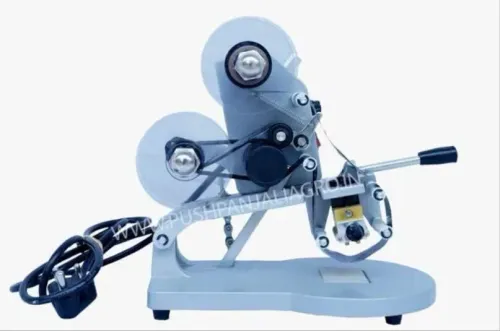
The supplier should describe the machine as a hot-foil, thermal-transfer coder: heated brass or steel type presses pigmented ribbon onto the package. For an electric ribbon batch coder for specifications in Ambala, demand a written schedule, not a catalogue claim of “electric operation”.
- Power: 230 V, single-phase, 50 Hz; connected load in watts; plug type and earthing arrangement.
- Heating and drive: heater rating and material, motor or ribbon-advance mechanism, temperature range, controller type, warm-up time and operating temperature.
- Coding capacity: print-line capacity, maximum code length, character height, available letters, numerals and symbols, type-holder dimensions, maximum coding area, ribbon width and roll size.
- Build and handling: machine dimensions, net weight, construction material, mounting method and package-indexing method.
- Supply terms: warranty period and availability of replacement ribbon and type.
| Nominal speed | Tested speed for the longest code | What to verify |
|---|---|---|
| Prints per minute stated by seller | Recorded on your actual pack | Manual feeding, ribbon advance, heater dwell, film tension and pack temperature |
| Short-code rating | One-, two- and three-line code | Actual output can fall as code length and heat demand increase |
The electric batch coding machine details should also include a sample layout showing one-, two- and three-line arrangements. Ask the supplier to test your longest code on the actual packaging film before ordering, then record the speed and operating temperature in the purchase specification.
What equipment, accessories and price scope should the quotation include?
The quotation must state exactly what arrives with the coder, not merely describe an “electric ribbon coder included accessories” package. Require these items in writing:
- Type holder
- Brass or steel character set
- Ribbon-reel mandrel
- Supplied ribbon roll or rolls
- Manual or conveyor mounting arrangement
- Hand tools, power cable, spare fuse and operating instructions
Ask separately whether a foot switch, conveyor bracket, photoelectric sensor, date wheel, additional alphabet and numeral sets, spare heaters, guards and worktable are included or optional. Add temperature controller, pressure adjustment, ribbon-width specification and pack guide to the acceptance checklist.
electric ribbon batch coder price in Ambala has no fixed government rate. Compare quotations only after matching these cost drivers:
| Option | Compare | Why it changes the quotation |
|---|---|---|
| Manual mounting | Operator-fed packs | Lower equipment scope |
| Conveyor mounting | Bracket, indexing and sensor | Higher integration cost |
| Basic coding | Fewer lines and type sets | Lower initial price |
| Integrated coding | Controller, sensors and extra sets | Higher flexibility |
Also align GST, freight, installation and warranty. Confirm replacement ribbon and type availability before comparing totals. Pushpanjali Industries can provide a line-by-line quotation separating machine, accessories, GST, transport to Ambala, commissioning and warranty. The useful figure is the delivered, tested package, not the lowest headline price.
Before issuing a purchase order, require a written service response time and a consumables list.
Related product
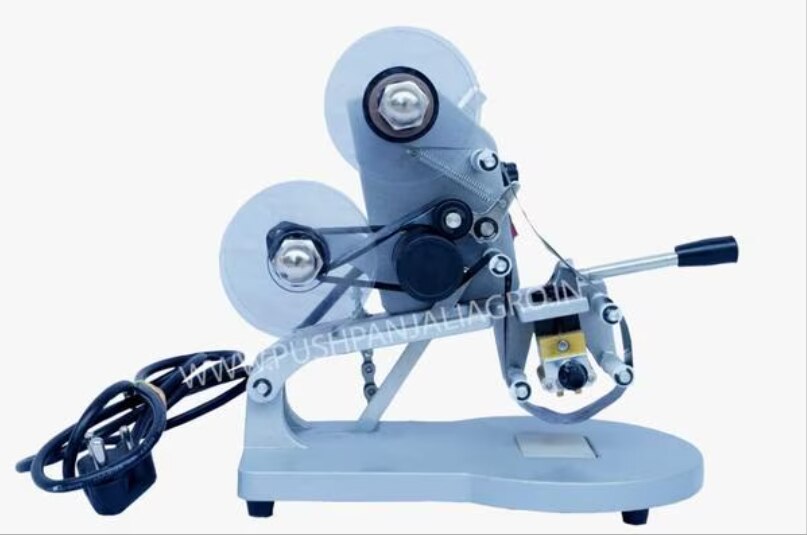
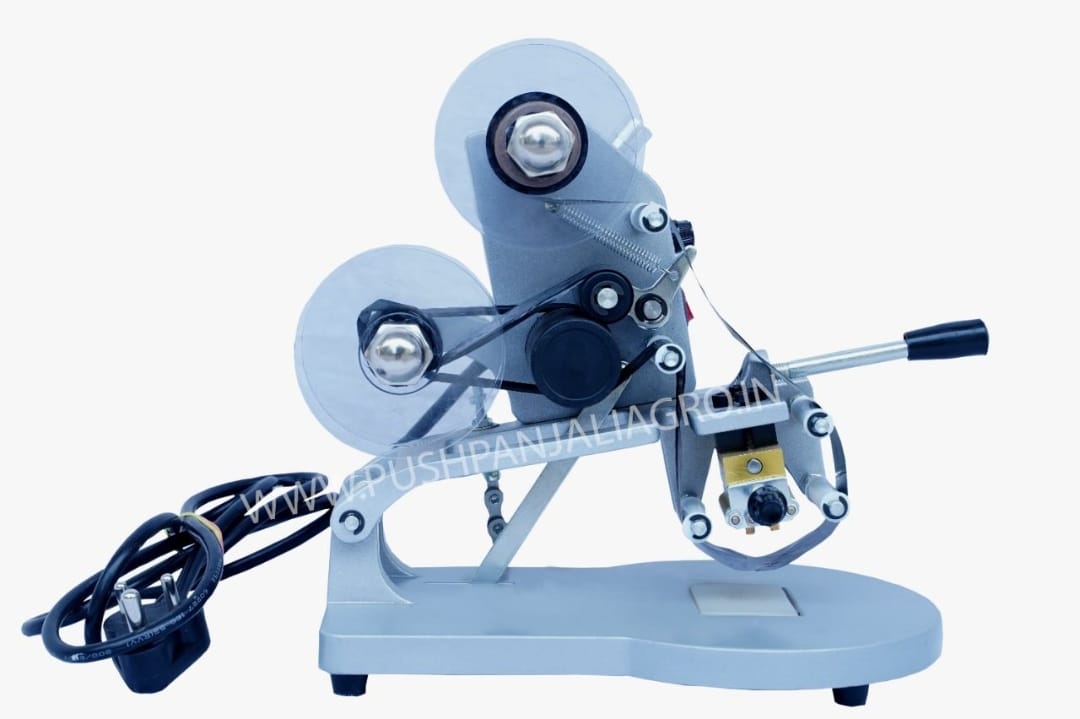 | Used For manually printing Date, Time, And Batch, or other Details on Pouch. View product → |
How do you install, set up and operate the coder on a food line?
A failed first impression usually comes from a wrinkled ribbon, misordered type or an unstable pouch position—not the heater itself. Use this sequence before releasing the line for production.
1. Isolate power before opening the coder. Fit the ribbon roll on the supply mandrel, thread it across the heated type face and onto the take-up reel, then secure it evenly without wrinkles or slack.
2. Fit the required character wheels or individual type into the holder. Compare every letter, numeral, punctuation mark and date element with the approved code before tightening the holder.
3. Restore power and enter the supplier’s starting values for print temperature and pressure. Do not change both immediately; each adjustment needs a clear result.
4. Position the pouch so its coding area is flat and repeats in the same place. Use the supplied guide, stop, foot switch, conveyor bracket or photoelectric sensor where fitted. Make test impressions on production film, adjusting temperature, pressure, dwell and ribbon advance one variable at a time.
5. Approve the setting only after testing the longest intended code at the fastest intended cycle. Plan the mark alongside the label: batch or lot number, manufacturing date, packed-on date, expiry or best-before date, and time when traceability requires it.
The mark does not replace FSSAI labelling or Legal Metrology declarations for net quantity, MRP, and manufacturer or packer details.
6. Record approved settings and retain samples. After production, switch off safely, remove ribbon debris and clean the print head by the specified method; never scrape heated type with a sharp tool.
Which films, ribbons and type materials produce a readable mark?
A ribbon coder works best on clean, dry, relatively smooth, heat-sealable surfaces. Polyethylene, polypropylene, laminated film, foil laminate, coated labels and similar non-porous materials can accept a hot-foil mark, but the exact ribbon grade must match the surface.
| Material | What to check | Likely failure |
|---|---|---|
| Polyethylene or polypropylene | Film thickness, heat resistance and seal surface | Pale or distorted characters from excess heat |
| Laminated film or foil laminate | Test the complete laminate, not one outer layer | Missing areas or poor adhesion |
| Coated labels | Coating, smoothness and required contrast | Smearing or ribbon sticking |
| Filled food pouches | Moisture, oil, dust, wrinkles and product temperature | Weak transfer on chilled or uneven packs |
Condensation, oil, dust, pouch wrinkles and cold surfaces cause pale characters, missing areas, smearing, ribbon sticking or distortion. Match ribbon grade, ink colour, ribbon width and heat resistance to the substrate and the contrast you need.
For dairy, tofu, paneer and curd packs, test after filling and sealing when moisture or refrigeration changes the surface. For snacks and dry foods, test the actual laminated structure rather than an outer paper sample.
Use brass or steel type containing every required letter, numeral, punctuation mark and date wheel. Select character height to fit the artwork.
Require a retained-sample test:
- Run the longest code at the fastest intended cycle.
- Inspect every character after handling and storage.
- Record temperature, pressure, ribbon grade and setup.
- Approve only when adhesion, rub resistance, contrast and legibility meet written criteria.
When is a ribbon coder suitable, and when should you choose another method?
Choose a ribbon batch coder for food retailers when the mark is short and static or manually changed: a lot code, packed-on date, best-before date or price on pouches, wrappers, labels or small cartons. It suits controlled, repeatable work rather than high-speed variable-data printing.
| Option | Speed and setup | Consumables and print control | Best fit |
|---|---|---|---|
| Manual stamp pad | Slow; cheapest setup | Ink pad and hand control; inconsistent, messy marks | Occasional simple marks |
| Handheld inkjet | Flexible, operator-controlled | Ink and solvent management; variable data | Small batches and changing codes |
| Continuous inkjet | Fast, non-contact | Ink and solvent; automatic data capability | Fast lines and changing data |
| Thermal-transfer overprinter | Fast digital control | Ribbon and compatible film; variable codes | Digitally generated codes |
| Pre-printed packaging | Fast handling after printing | No coding consumable; fixed artwork only | Unchanging information |
Use another method for high-speed automatic lines, frequent code changes, non-heat-sealable or unsuitable film, wet or chilled pouch surfaces, barcode or QR-code printing, or digitally generated serial numbers. Pre-printed packaging cannot economically absorb changing batch information without an added coder.
Change methods if a trial on the actual packaging film and line setup fails adhesion or legibility checks. Compare these disqualifiers before ordering:
- Speed at the required code length
- Setup time and changeover effort
- Ribbon, ink or solvent consumption
- Print quality and rub resistance
- Automatic data control
- Validation and recordkeeping burden
Request a demonstration using the real pouch, code length, handling process and storage conditions—not a paper test.
Frequently asked questions
Which specifications should you demand from an Ambala supplier?
Request the supply voltage, power rating, coding area, character height, type capacity, heating range, operating speed, compatible pack materials and warranty in writing. Ask the supplier to state whether the quoted speed depends on a specific film, ribbon and operator.
What should an electric ribbon batch coder quotation include?
Check that the price scope names the coder, heated type holder, mounting or hand-operated assembly, ribbon rolls, type sets, adjustment tools, guards, manuals, installation, operator training, taxes, freight and after-sales support. Ask for quantities and exclusions rather than accepting an equipment photograph as the scope.
How do you set up a ribbon batch coder on a food line?
Mount the coder square to the film path, align the type face with the intended print area, fit the ribbon in the correct unwind direction and set temperature, pressure and dwell time through trials. Confirm a clean mark on the actual packaging, then record the settings and inspect the first packs after every changeover.
Which films, ribbons and type materials produce a readable mark?
Test the exact laminate or film with a ribbon formulated for that surface. Use clean, sharply edged brass or steel type, correct heating and enough dwell to transfer pigment without smearing, perforating or distorting the pack. Keep ribbon width and type layout compatible with the holder.
When is a ribbon coder unsuitable?
Choose another method when you need frequent variable data, barcodes or QR codes, noncontact printing, very high line speed or coding on irregular surfaces. Thermal inkjet, continuous inkjet and laser systems address different combinations of those requirements.
Keywords